2023-08-06

fanf: (Default)

https://dotat.at/@/2023-08-05-keycaps.html

There's plenty of material online about the bewildering variety of keycaps, eg, eg, but I learned a few things that surprised me when working on Keybird69.

nightfox
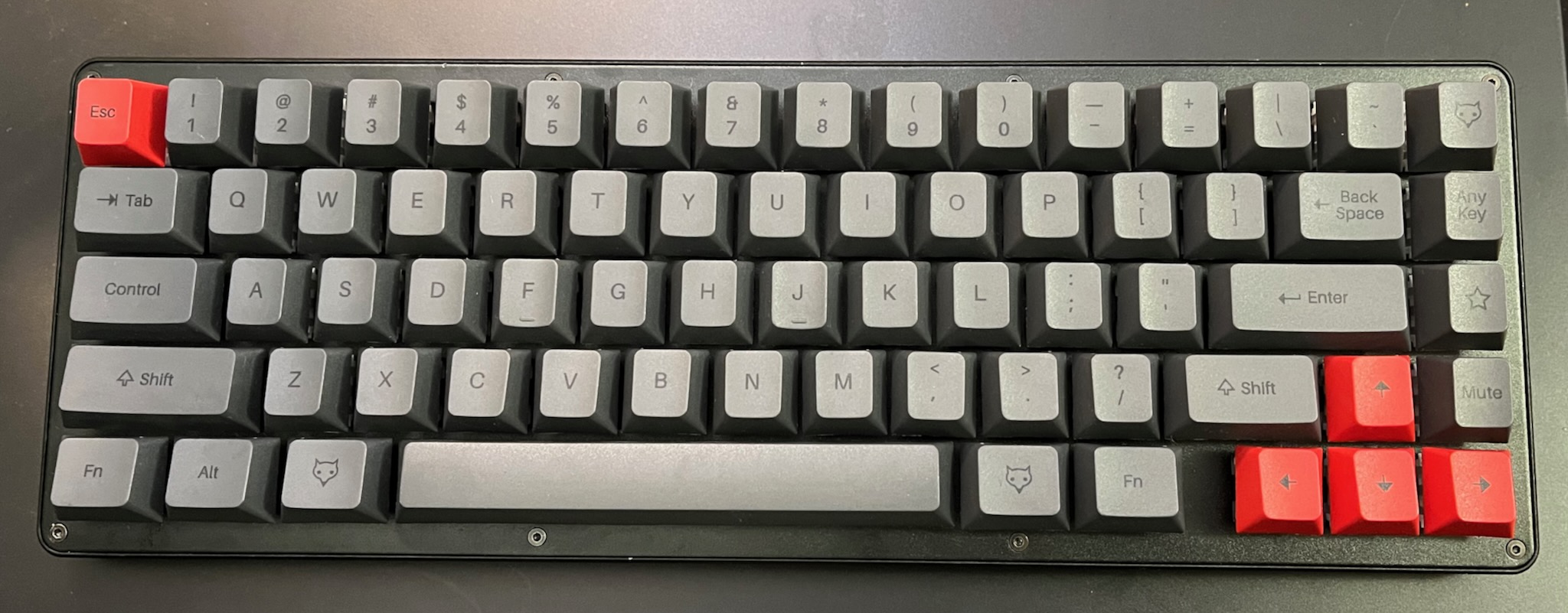
a 65% keyboard in shades of grey with red escape and arrow keys

I found out that the remaining stock of Matteo Spinelli's NightFox keyboards were being sold off cheap because of a manufacturing defect. I grabbed one to find out what it's like, because its "True Fox" layout is very similar to the unix69 layout I wanted.

My NightFox turned out to have about three or five unreliable keyswitches, which meant it was just about usable -- tho the double Ts and unexpected Js rapidly became annoying.

But it was usable enough that I was able to learn some useful things from it.

legibility

The black-on-grey keycaps look cool, but they are basically illegible. (The picture above exaggerates their albedo and contrast.) This is a problem for me, especially while I was switching from the HHKBeeb ECMA-23-ish layout to an ANSI-ish TrueFox-ish unix68 layout.

Fortunately I learned this before making the mistake of buying some fancy black-on-grey keycaps.

up arrow

I had seen a few keycap sets with extra up arrows, which puzzled me (For example.) The NightFox came with an extra up arrow, and eventually I twigged that it makes the profile of the arrow cluster a bit nicer.

Usually, in a sculpted keycap profile (where each row of keycaps has a differently angled top surface) the bottom two rows have the same angle, sloping away from the typist. This means the up arrow key slopes away from the other arrows on the row below.

The extra up arrow keys typically match the tab row, which is flat or angled slightly towards the typist. This gives the arrow cluster a more dishy feeling.

Unfortunately the keycaps I ordered do not have extra up arrow keys with tab row angle as an option. I did not realise until after I ordered them that I could have got a similar effect by using a reversed down arrow as an up arrow -- it makes a sharper angle, but still feels nicer. So I'm using a reversed arrow key for Keybow69's up button and my up/down legends both point the same way.

right column

Some keycap sets have multiple page up / page down / home / end keys with different row profiles so that people with 65% and 75% keyboards can rearrange the right column of keys. (For example.)

Instead of the superfluous navigation keys, I used the NightFox novelty keycaps on my keyboard. (You can see the ANY KEY, the cute fox logo, etc. in the picture above.) These all had a top row profile, and at first I thought this was an ugly compromise.

But it turns out that the difference in height between the right column and the main block of keys is really useful for helping to keep my fingers in the right places. It makes me less likely to accidentally warp a window when I intend to delete a character.
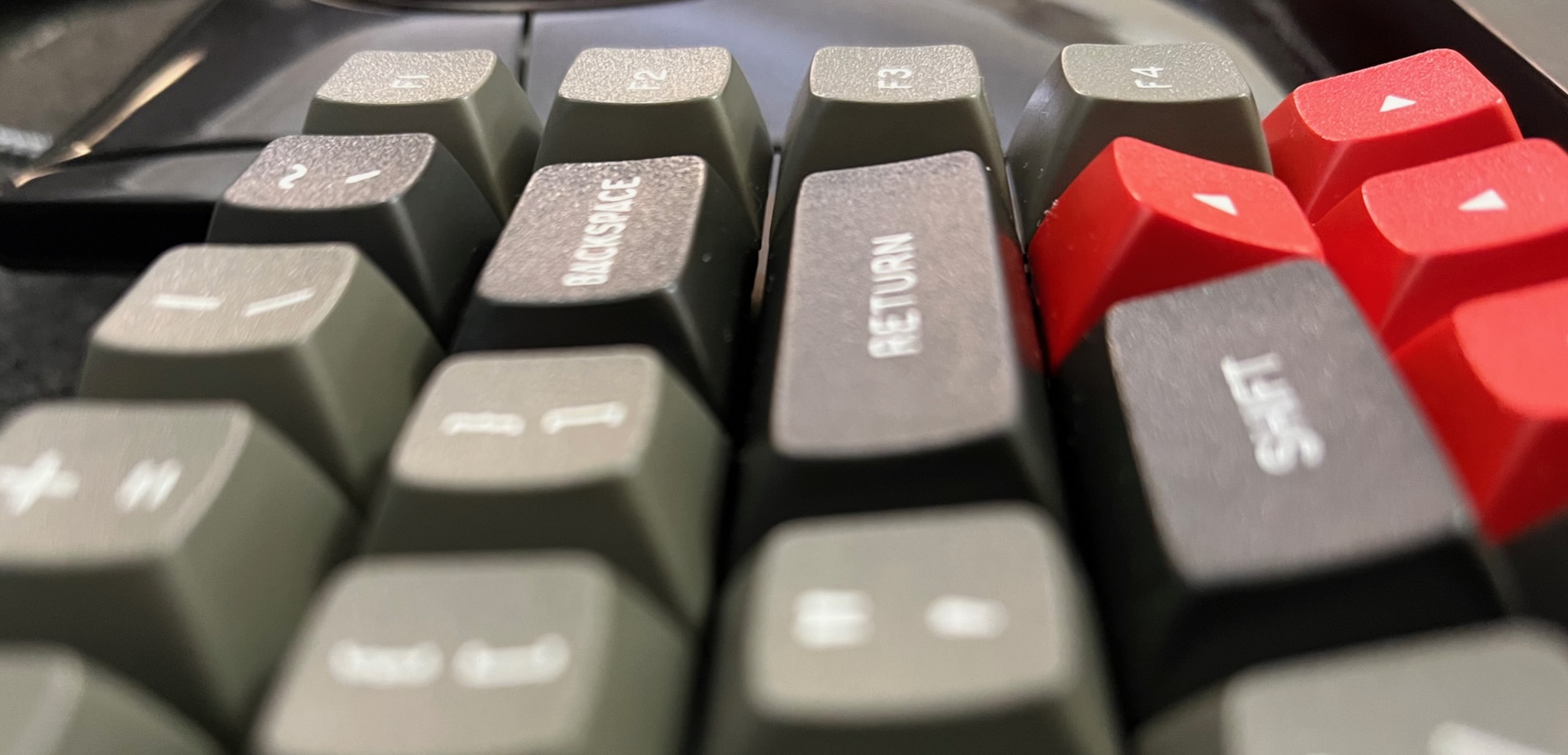
a closeup of Keybird69 looking along its RETURN key towards the column of F keys and arrow keys; the angle of the F key next to RETURN is noticably different, and the angle of the up arrow key is outrageously jaunty

The mismatched angle of the up arrow key is similarly helpful. Matt3o added a gap next to the arrow keys in his True Fox design to make the arrow keys easier to locate, but I think that isn't necessary with an out-of-profile up arrow (which is also one of Matt3o's favourite features).

profile

I previously thought I wanted a uniform keycap profile (e.g. DSA like the keycaps that came with my Keybow 2040) but these discoveries taught me a sculpted profile is more practical for the keyboard I was making.

Another research purchase was a grab bag of random surplus keycaps, which is about as useless as you might expect: hundreds of keycaps, but too many duplicates to populate a keyboard. (My Keybow 2040 now has a very colourful mixture of miscellaneous keycaps.) The grab bag I got was mostly SA profile, which is tall and steeply angled on the near and far rows. In their normal orientation, SA function keys would probably not work so well on the right column of my keyboard, making a shape like a warehouse roof. Maybe they would work when rotated 90°? Dunno.
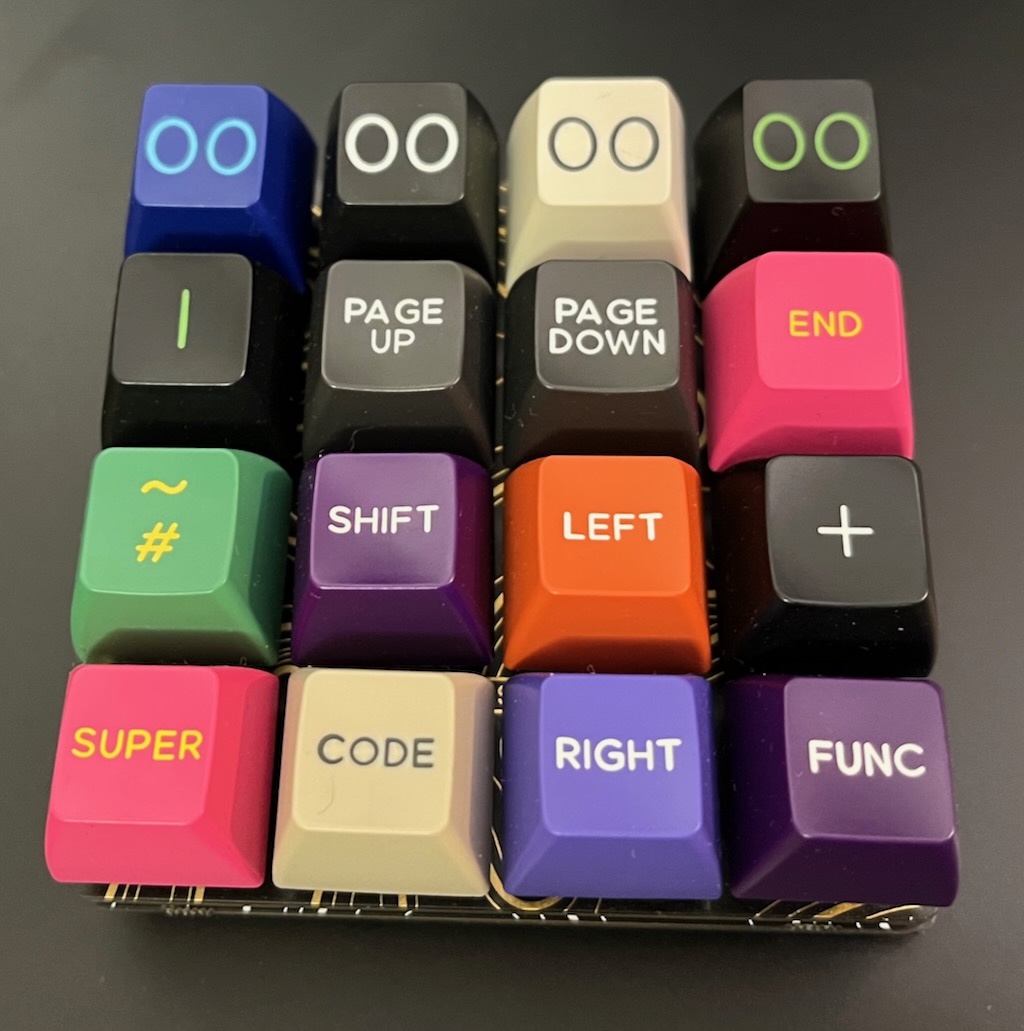
a 4x4 macro pad with a mismatched collection of blue green pink orange purple black white beige keycaps

One of my old beliefs remained: I still prefer spherical indentations in the tops of my keycaps. They are more cuddly around my fingertips than the more common cylindrical indentations.

Annoyingly, many of the newer sculpted spherical keycap sets are hard to get hold of: often the only places that have them in stock will not ship to the UK at an affordable price. (For example.) Also annoyingly, the cheaper keycap sets almost never have the extras needed for unix69 compatibility. Bah.

collection

The black-on-grey NightFox keycaps are Cherry profile (cylindrical indentations, sculpted rows, very short), and the keycaps that WASD printed for my HHKBeeb are OEM profile (like Cherry profile but taller). The HHKBeeb doesn't have spherical keycaps because I don't know anywhere that will do affordable one-off prints other than OEM profile. I also have a set of TEX ADA keycaps (uniform rows, short) which have lovely deeply scooped spherical tops, tho I am not a fan of their Helvetica legends.

So instead of a set of DSA keycaps (DIN height, spherical top, uniform) as I originally planned, I got DSS keycaps (DIN height, spherical top, sculpted). I love the Gorton Modified legends on Signature Plastics keycaps: as a business they descend from Comptec who made most BBC Micro keycaps.

I think Matt3o's MTNU Susu keycaps are closer to my ideal, but I missed the group buy period and they have not been manufactured yet. And I wish they had an option for icons on the special keys instead of WORDS. I suspect the MTNU profile will become very popular, like Matt3o's previous MT3 profile, so there will be chances to get some in the future.

fanf: (Default)

https://dotat.at/@/2023-08-06-ltbs.html

My Keybird69 uses LEGO in its enclosure, in an unconventional way.

story time

Two years ago I planned to make a typical acrylic sandwich case for HHKBeeb, in the style of the BBC Micro's black and yellowish beige case. But that never happened because it was too hard to choose a place to get the acrylic cut so my spec.

My idea for using LEGO in a keyboard case was originally inspired by James Munns, who uses LEGO for mounting PCBs, including at least one keyboard.

Howver, I could not work out how to make a case that is nice and slender and into which the parts would fit. It is possible -- the KBDcraft Adam solves the problem nicely, and by all reports it's pretty good as a keyboard, not just a gimmick.

To make the PCB design easier, I am using a Waveshare RP2040-Tiny. It's more flexible than the usual dev boards used in custom keyboards because it has a separate daughterboard for the USB socket, but I had the devil of a time working out how to make it fit with LEGO.

brainwaves

  • Instead of using LEGO for the base, use FR-4, same as the switch mounting plate;

  • There isn't enough space for SNOT so I can't use LEGO studs to attach both the top and bottom of the case; why not use non-LEGO fasteners instead?

  • That will need through-holes, so maybe LEGO Technic beams will work?

  • Maybe the fasteners I got for the HHKBeeb case will work?

fasteners

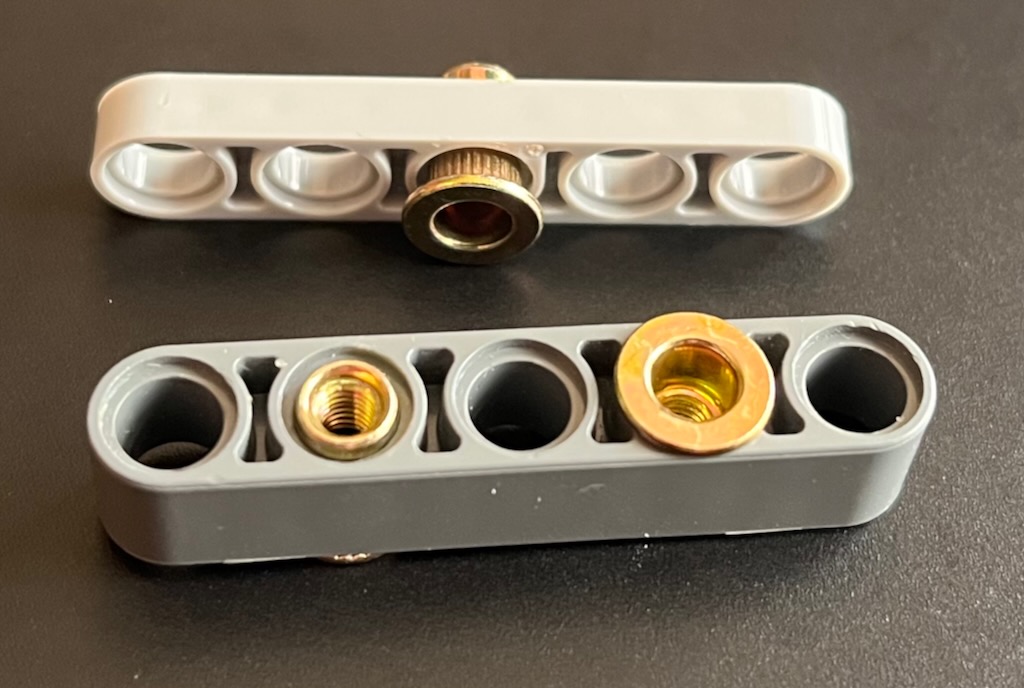
a half-width beam on its side with a brassy rivet nut passing through it; a full-height beam with two rivet nuts inserted, one showing its flange, the other its thread

I wanted the fasteners for the HHKBeeb case to be as flat as possble; but acrylic does not work well with countersunk screws. Instead I looked for fasteners that protrude as little as possible.

For machine screws, I found the magic phrase is "ultra thin super flat wafer head". These typically protrude 1mm or less, whereas the more common button head or pan head protrude about 2mm or more.

I also discovered rivet nuts. They are designed to be inserted into a sheet metal panel and squashed so that they grip the panel firmly. But I just wanted them for their thin flange, less than 1mm.

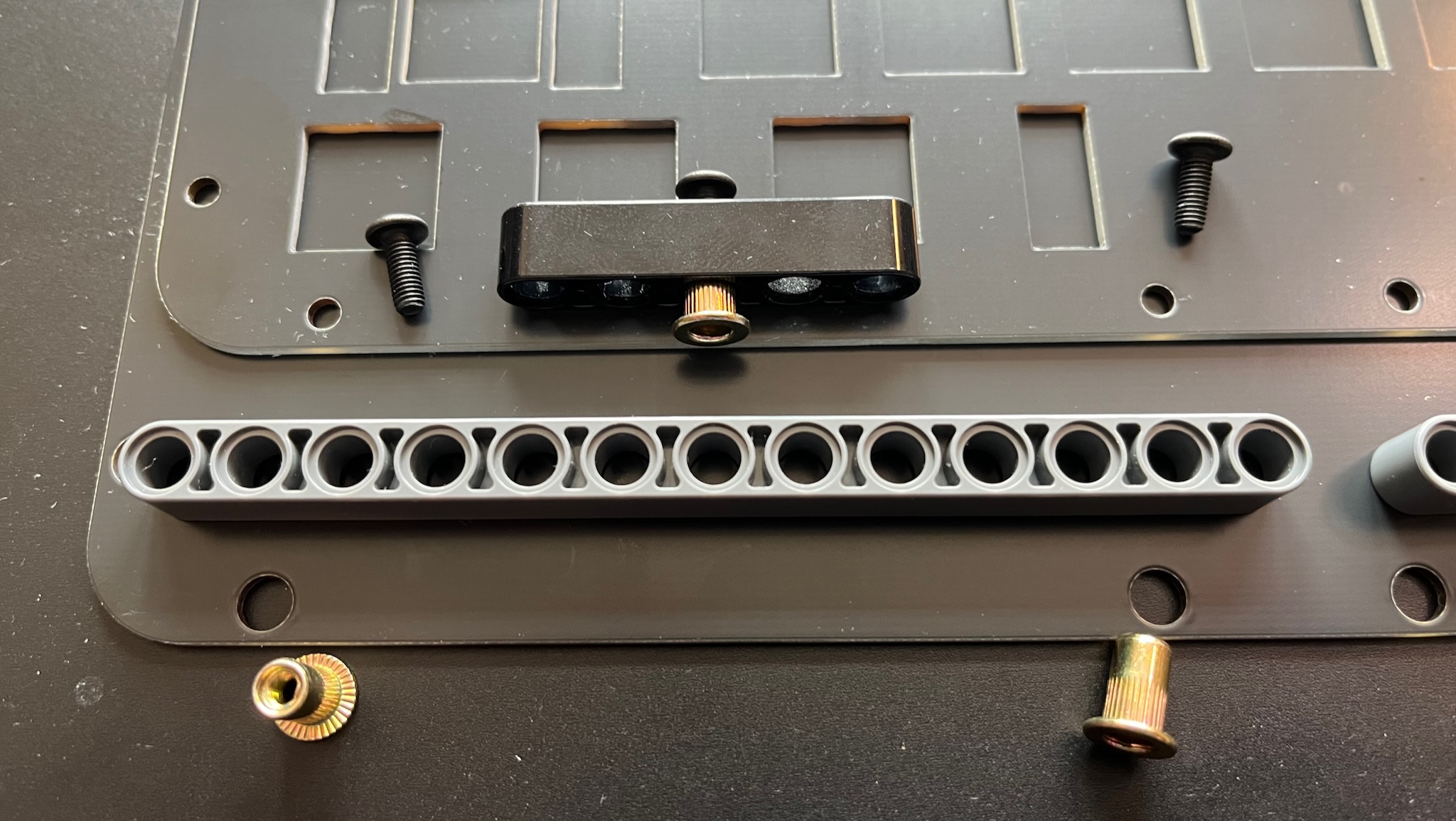
The usual fasteners for a sandwich case are machine screws inserted top and bottom, with a standoff in between. But Keybird69 uses machine screws in the top and rivet nuts in the bottom.

I'm using M3 rivet nuts and machine screws. The outer diameter of the rivet nuts is 5mm; the inner diameter of the Technic holes is 4.8mm. Fortunately the beams are made from flexible ABS, so the rivet nuts can be squeezed in and make a firm press fit. They can be pushed out again with a LEGO Brick Separator.

un-assembled parts of keybird69: a black switch mounting plate on top of a black base plate, with a lego beam and some screws and rivet nuts placed to show how they will fit together

vertical

Many dimensions of the keyboard are determined by the Cherry MX keyswitch de-facto standard.

The switch mounting plate must be about 1.5mm -- the standard PCB thickness of 1.6mm works fine.

The top of the PCB is 5mm below the top of the plate. The bottom of the PCB is also 5mm below the bottom of the plate because they are the same thickness. (Usually.)

The electronics are soldered to the bottom of the PCB.

  • switch through-hole pins protrude 1.7mm
  • the Kailh sockets need 1.8mm
  • RP2040-Tiny needs 2.1mm

A LEGO Technic beam is 8mm high (along the length of its holes).

The bodies of the switches and the PCB use 5mm of the beam height, leaving 3mm for the electronics. Plenty of space!

The height of the enclosure is 8 + 1.6 + 1.6 = 11.2 mm, which is pretty slender.

HHKBeeb's generic case uses 10mm acrylic so it's 2mm thicker, and the NightFox is about the same.

usb-c

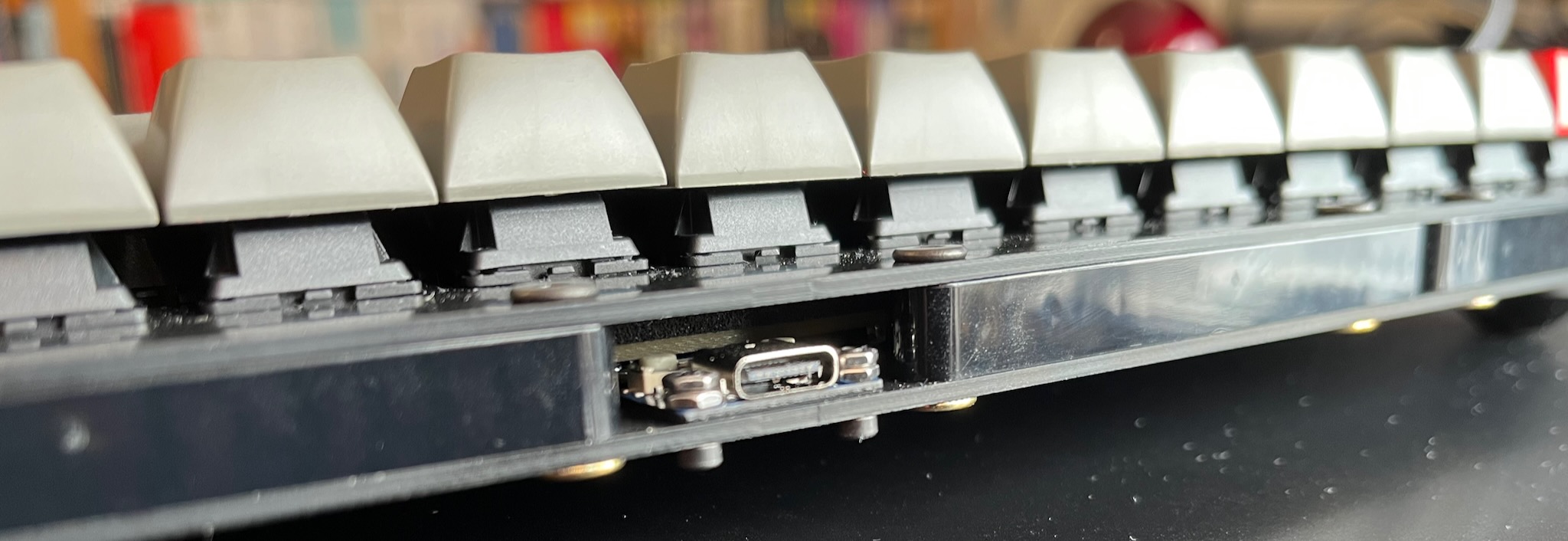
a close-up picture of the USB socket at the back of my keyboard; the 1mm daughterboard holding the receptacle is screwed to the 1.6mm base plate

The Waveshare RP2040-Tiny daughterboard is problematic: its PCB is 1mm thick, and the USB-C receptacle is about 3.5mm high. It also has a couple of buttons for resetting or reflashing the RP2040, and they are a similar height.

I could not find a comfortable way to make space for it by cutting away part of the PCB to give it enough headroom. Then I had another brainwave!

I am not constrained by LEGO's rectilinear grid, so I could make space by angling the back of the case outwards slightly. The middle of the back of the case has the extra few milimetres needed for the USB daughterboard.

If you look closely at the picture above, behind the USB-C receptacle and the M2 nuts, you can see the whiteish top of one of the buttons, and behind that is the beige textured edge of the PCB.

(Also, I need to turn the beams round so that the injection moulding warts are not visible!)

horizontal

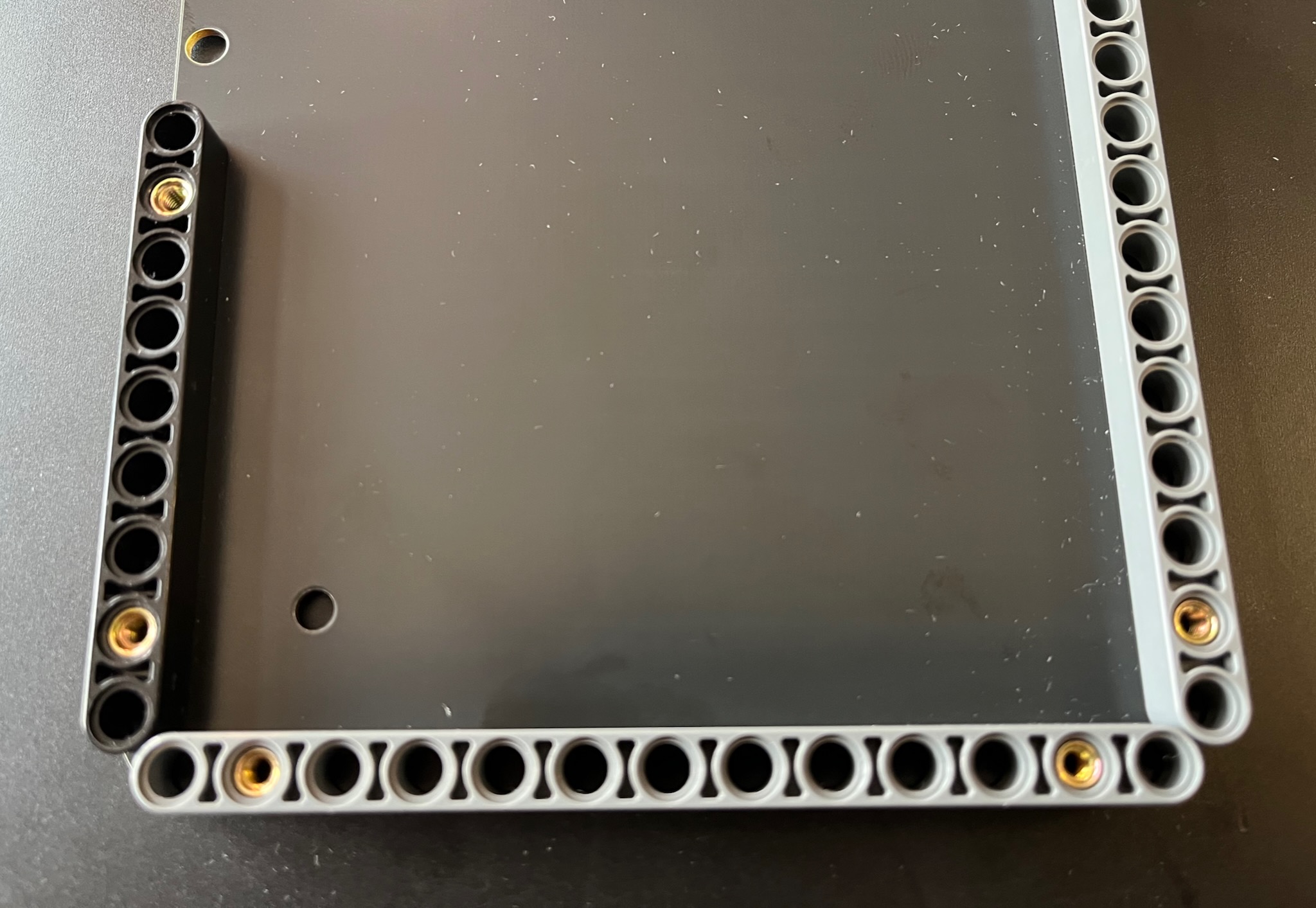
one end of the keybird69 base plate with lego technic beams attached using rivet nuts

LEGO studs use an 8mm grid. Keys are on a 3/4 in grid, or 19.05mm.

Keybird69 is 5 keys deep, which is slightly less than 12 LEGO studs.

It is 16 keys wide, which is slightly more than 38 LEGO studs. Three LEGO Technic 13 hole beams are 39 studs long.

The front and sides of Keybird69 are enclosed with 5 beams of 13 holes each, which stick out half a stud past the block of keys. They meet at the corners so that the tangent is 45° where the rounded ends of the beams are closest.

This arrangement leaves about 1mm clearance around the PCB. Spacious.

Technic beams are not as square in cross-section as you might expect. Their height (through the holes) is 8mm, whereas their width (across the holes) is 7.2mm. In Keybird69 I left 0.4mm gap between them -- I could have cut that down to 0.2mm without problems.

the corner of an empty keybird69 case showing the switch mounting plate screwed into the beams and base plate

finishing touches

I used a 10mm radius of curvature for the corners. Apart from where the beams meet, the switch plate and base plate are very nicely flush with the beams.

I tried using a Sharpie permanent marker to blacken the edges of my Keybow 2040, but the ink did not stick very well. On Keybird69 I used an acrylic paint marker pen, which worked much better. Compare the raw fibreglass beige of the edges in the picture above to the black edges below.

One thing that probably isn't clear from the pictures is that the FR-4 plates have an unexpectedly lovely matte reflective quality. I think it might be because the black solder mask is not completely opaque so the layer of copper underneath gives it a bit of shine.

I am also getting some black 13 hole Technic beams to replace the dark grey ones, gotta make sure the dust shows up clearly on every possible surface!

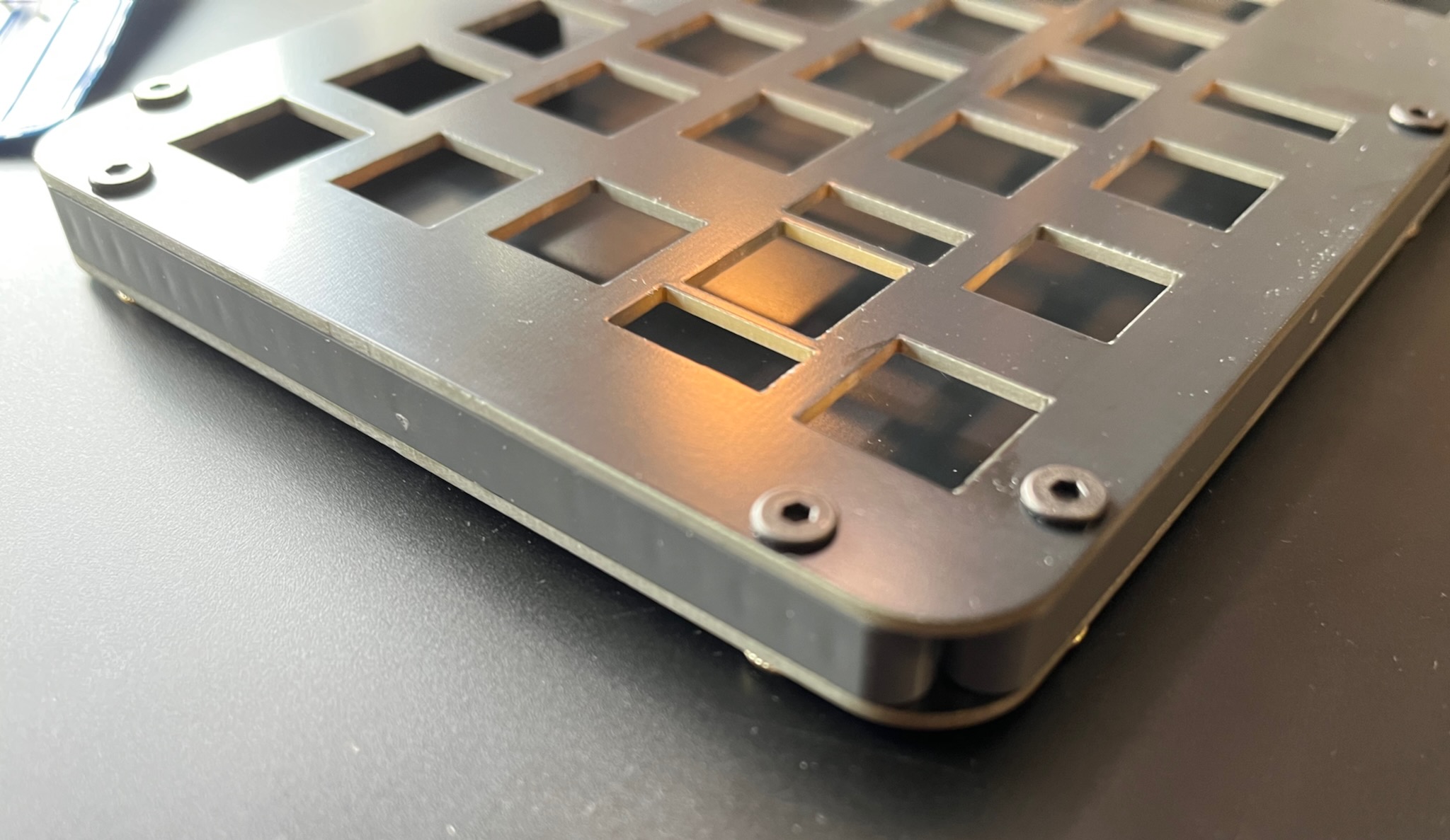
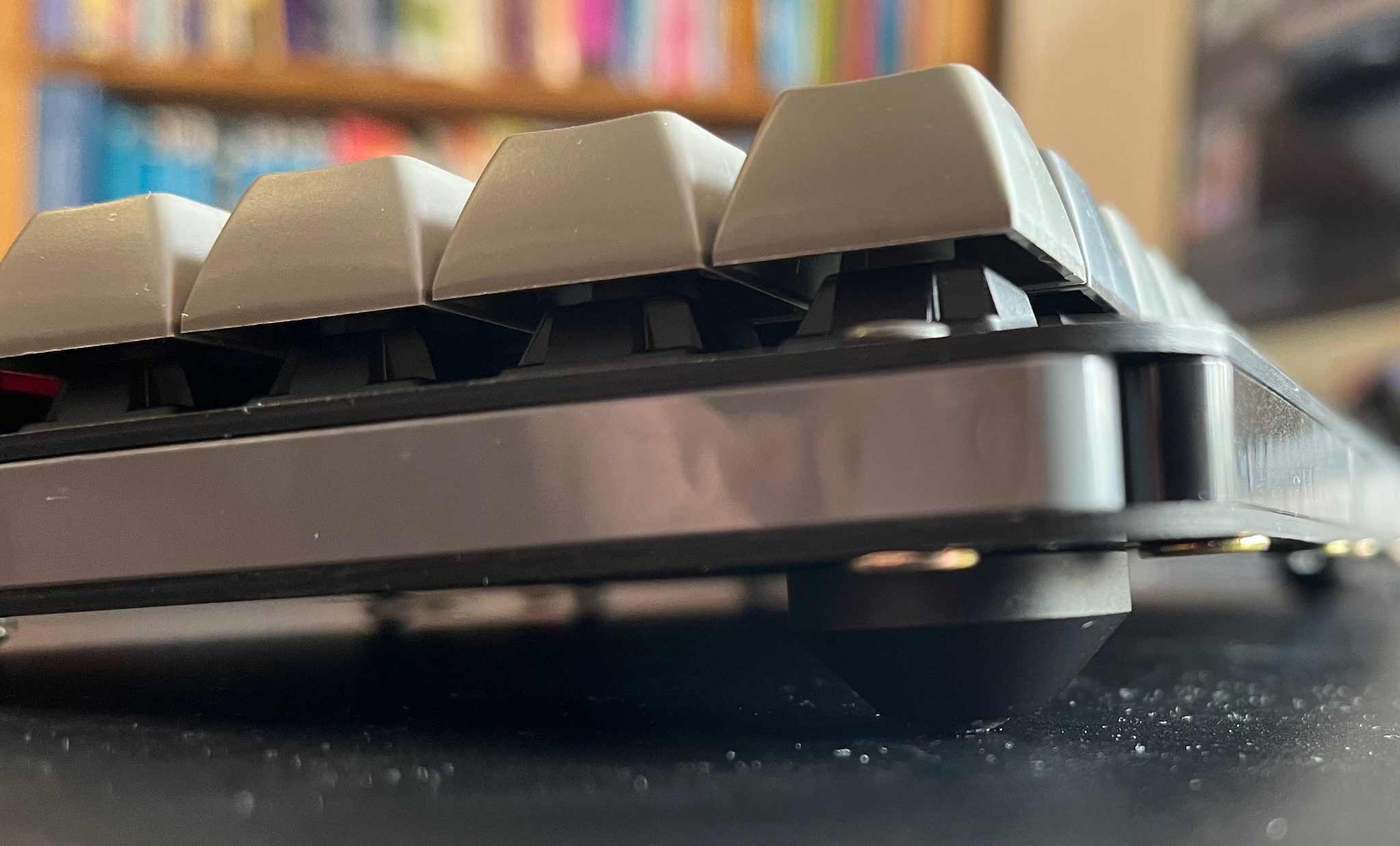
the corner of the completed keybird69 case showing one of the conical aluminium feet

February 2026

S M T W T F S
1234567
891011121314
1516 1718192021
2223 2425262728

Most Popular Tags

Style Credit

Expand Cut Tags

No cut tags
Page generated 2026-03-08 04:56
Powered by Dreamwidth Studios